
A high-performance 2D compositing engine for Flutter and Dart, using
Blend2D internally as its rasterization backend via
Dart FFI. Compose typed Layers into a Scene and render to PNG at native
speed — on Android, iOS, macOS, Linux, and Windows.
This is an independent project built on top of Blend2D; it is not an official Blend2D binding, wrapper, or port, and is not affiliated with or endorsed by the Blend2D project.
Using this from a Flutter app?
layer_canvasitself intentionally stays Flutter-free — its own types (Color32,LayerPaint,Point2D,TextWeight...) avoid colliding withdart:ui/material.dartso the same API works in a plain Dart script, a server, or a Flutter app. For Flutter specifically, we recommendlayer_canvas_flutterinstead of depending on this package directly — it removes that abstraction gap with widgets and adapters that acceptColor,Offset,FontWeight,BoxFit,Gradient, etc. directly, plus Flutter-specific conveniences like asset-based font preloading,devicePixelRatio-aware rendering, and tap hit-testing — so you never have to juggle two parallel APIs.
import 'package:layer_canvas/layer_canvas.dart';

final scene = Scene(width: 400, height: 300)
  ..add(RectangleLayer.filled(
    width: 400,
    height: 300,
    color: Color32.fromRGB(20, 20, 20),
  ))
  ..add(PathLayer.filled(
    path: LayerPath.circle(const Point2D(100, 150), 70),
    color: const Color32.fromRGB(0, 180, 90),
  ))
  ..add(RectangleLayer(
    transform: const LayerTransform(position: Point2D(220, 60)),
    size: const Size2D(140, 180),
    paint: LayerPaint(
      gradient: LinearGradient.colors(
        start: const Point2D(0, 0),
        end: const Point2D(1, 1),
        colors: [Color32.fromRGB(255, 0, 0), Color32.fromRGB(0, 0, 255)],
      ),
    ),
  ));

await Renderer().renderToFile(scene, 'output.png');
That's a solid rectangle, a circle, and a gradient rectangle — three
different primitives, three lines each. No dart:ui, no widget tree, runs
the same in a dart run script, a server, or a Flutter app.
Real-world use case — a GPS photo watermark, built entirely in plain Dart:
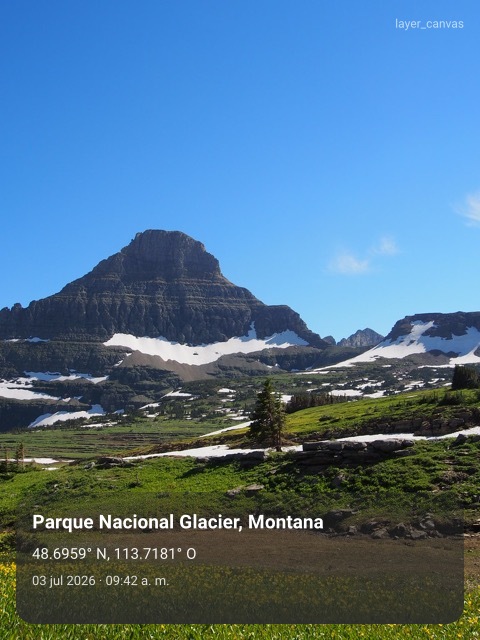
// Abbreviated — see example/ for the complete, runnable version.
final scene = Scene(width: 480, height: 640, background: photoSource)
  ..add(RectangleLayer(
    transform: LayerTransform(position: Point2D(16, panelTop)),
    size: Size2D(panelWidth, 132),
    paint: LayerPaint(gradient: scrimGradient), // fades top -> bottom
    cornerRadius: 18,
  ))
  ..add(TextLayer(text: location.placeName, fontWeight: TextWeight.bold, color: Color32.white))
  ..add(TextLayer(text: location.coordinatesLabel, color: Color32.fromRGB(245, 245, 245)));
See the full runnable version in example/
and every other layer type (gradients, paths, SVG import, text, images,
groups) in the full guide.
- Typed layer model —
RectangleLayer,PathLayer,TextLayer,ImageLayer,Group - Native Blend2D renderer — compiled as a Dart Native Asset, no separate build step, no CMake invocation needed
- Gradients & vector paths — linear/radial/conic gradients, arbitrary Bézier paths, circles/ellipses, and SVG import
- Stroke styling — cap (butt/round/square), join (miter/round/bevel),
miter limit, and dash patterns on
PathLayer - Multiple output formats — PNG (default), BMP, or QOI
- JSON serialization —
Scene/Layer/etc. all havetoJson/fromJson, including custom layer types viaLayerRegistry - Native text rendering —
TextLayerships with an embedded Roboto (regular/bold, multiple weights), and apps can register their own fonts viaFontRegistry; text automatically word-wraps to fitsize.widthand always breaks on explicit\n - Clipping —
Layer.clipToBoundsclips a layer's own painted content to its own size box, moving/rotating with it - Pure Dart core — no dependency on Flutter or
dart:ui; the sameScene/RendererAPI runs in a plaindart runscript, a server, or a Flutter app - Full 2D transform — position, rotation, scale, and configurable pivot anchor on every layer
- Compositor semantics —
zIndex,opacity,visiblerespected on all layer types - No JIT / no AsmJit — safe on W^X-constrained platforms (iOS App Store, Impeller on Android)
- Extensible — add new layer kinds by subclassing
Layer; the engine core andScenenever change
| Platform | Architecture | Status |
|---|---|---|
| Android | arm64-v8a | ✅ Supported |
| Android | x86_64 (emulator) | ✅ Supported |
| iOS | arm64 | ✅ Supported |
| macOS | arm64 / x86_64 | ✅ Supported |
| Linux | x86_64 | ✅ Supported |
| Windows | x86_64 | ✅ Supported |
Add to pubspec.yaml:
dependencies:
  layer_canvas: ^0.1.0
No additional native build setup is required — the Blend2D library is compiled and bundled automatically via Dart's Native Assets mechanism.
The quick start above is the whole trivial case. For
everything else — gradients, paths and polygons, SVG import, images,
custom fonts, groups, the complete API reference, architecture, and how to
build/test the package — see doc/GUIDE.md.
Contributions are welcome! See
CONTRIBUTING.md
for how to set up a dev environment and submit a pull request, and our
CODE_OF_CONDUCT.md.
To report a security vulnerability, see
SECURITY.md
instead of opening a public issue.
MIT — see LICENSE. See THIRD_PARTY_NOTICES.md
for the licenses of vendored/embedded third-party code (Blend2D, Roboto).